Try online photo noise reduction with Standard enhancement. Compare low-light grain against real texture and learn when a dedicated denoiser is needed.
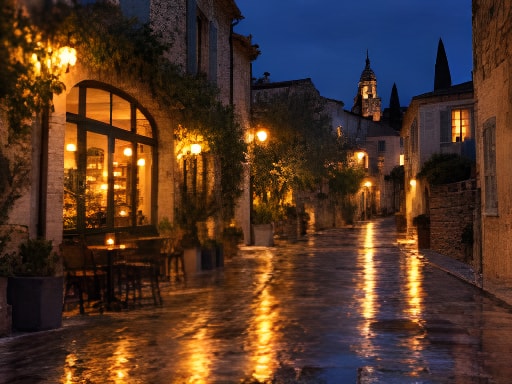
After the street lights come onTry a sample below
Simulated low-quality inputStandard 2× result
Drag the divider or use arrow keys in steps of five percent. Home and End show the full result or original.
The night scene, woven fabric and portrait offer different areas to inspect. Every result also includes 2× enlargement, so these comparisons do not isolate denoising or demonstrate a specialist high-ISO engine.
Simulated low-quality inputStandard result
Drag the divider or use arrow keys in steps of five percent. Home and End show the full result or original.
Low light
After the street lights come on
Move the divider over dark paving and walls, then inspect window edges. Check whether visible grain becomes less distracting without replacing it with new lines or losing structure.
256 × 192 → 512 × 384Standard · 2× · face restoration off
Drag the divider or use arrow keys in steps of five percent. Home and End show the full result or original.
Textures
Made to be seen up close
Woven fibers are real detail, not noise. Compare the weave for smoothing, repeated patterns and estimated threads before accepting a cleaner-looking result.
256 × 192 → 512 × 384Standard · 2× · face restoration off
Example originals are AI-generated simulated low-quality inputs, not customer photographs. Comparisons use actual Standard model outputs. Dimensions, scale and settings are shown for each evaluation; results vary by source.
THREE SIMPLE STEPS
How to try photo noise reduction
01
Start with the original
Use the camera file and inspect both a shadow area and a textured surface. Export a supported copy if your original is RAW.
02
Try a modest first pass
Choose Enhance photo and Free Standard for an eligible same-size trial. There is no separate denoise-strength slider; avoid enlargement until you know whether cleanup helps.
03
Check the texture tradeoff
Open the 100% view and compare shadows, hair and fabric. Keep the original or use a dedicated editor if useful detail becomes smooth or artificial.
Tell noise apart from detail and compression
Tell noise apart from detail and compression
Area to inspect
What it can indicate
What to preserve
Random grain or colored speckles in shadows
Sensor noise or limited low-light signal
Recognizable scene structure; some grain can be preferable to invented detail.
Blocks beside bright signs and edges
Compression rather than sensor noise
Accurate lines and letters; use a less compressed original when possible.
Repeated fibers, hair or skin pores
Real subject texture
Natural material and identity rather than the smoothest possible surface.
Heavy grain in a RAW source
A case for a dedicated RAW workflow
Use adjustable denoising before exporting; this uploader accepts JPG, PNG and WebP.
A CLOSER LOOK
What to look for in your result.
Noise often shows up in shadows and flat surfaces, while real texture belongs to the subject. Good photo noise reduction should make the first less distracting without erasing the second.
Read the noisy parts of a photo
Look at a dark wall, sky or soft background. Random grain and colored speckles can be sensor noise; blocks near edges are often compression. Fine cloth, hair and grass are real detail. Judge these areas separately rather than expecting every textured surface to look smooth.
Try modest cleanup first
Standard enhancement may improve mild noise together with softness. This release has no dedicated high-ISO denoising model or strength slider. Compare the result at 100% and check whether fabric or skin became waxy. Keep the original if noise is replaced with artificial texture.
Improve your starting file
When you still have a RAW file, a RAW editor offers more control over exposure and noise before export. For phone images, use the camera original and avoid saving repeatedly through social apps. Brightening a very dark JPEG may reveal more noise because the source contains little signal in the shadows.
GOOD QUESTIONS
Before you begin.
Can Standard remove all noise from a night photo?
No. It may improve mild noise, but heavy high-ISO noise needs a dedicated workflow. Results depend on how much useful signal the source contains.
Why did noise reduction remove detail?
Fine texture and noise can look similar. Compare hair, fabric and foliage carefully, and keep a result only when the cleanup preserves the subject.
Can I upload RAW files?
This uploader supports JPG, PNG and WebP. Develop the RAW file in your camera or RAW editor and export a supported copy.